Archive for December, 2009

Small tutorial W7100

Tuesday, December 22nd, 2009

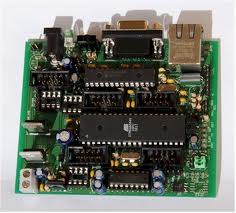
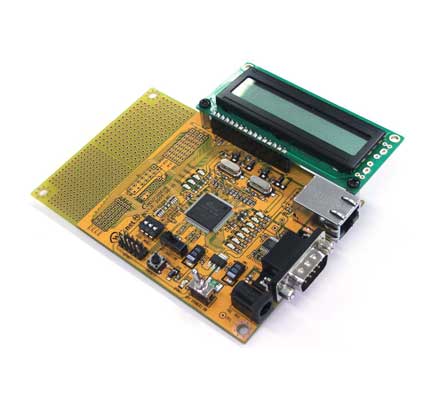
Small tutorial about the iMCU7100EVB on my homepage.
Check http://members.home.nl/bzijlstra

IMCU7100EVB.jpg

Remote Xmas-LEDs…

Sunday, December 20th, 2009

Webpage with three buttons working. Can blink the three LED’s on the iMCU7100EVB-board. LED0, LED1, LED2. And my suggestion about the XRAM option is working. Instead of filling a string with the complete HTML-page, I use the XRAM. Filling about 650 bytes with the HTML-code that is send while pushing on a button. In the first 10 characters the “POST /” can be found. And at the end of the packet the LED0=0, LED1=0 or LED2=0 can be found, meaning a button has been pressed.

web_blinky.jpg

Got it!!!

Saturday, December 19th, 2009

Got it!! The access to the extra 64 kByte RAM. Have been working with the standard Bascom-8051 commands for XRAM but that didn’t work. With an simple INP and OUT it is possible to access the extra RAM. I have seen in the datasheet it is possible to build-up the TCP/IP payload in the extra RAM and with a special copy command copy this payload to the transmit buffer of the TCPIP-core TX-buffer. In the samples it is done with the wizmemcopy, ID1 and ID0 are used to indicate if DPTR and DPTR1 should be incremented or decremented automatically. Perhaps have to do this in $ASM…$ENDASM within Bascom-8051.
At the moment a simple HTTP-page running. Have to walk trough a complete packet to check for the POST / command. Will use a buffer in extra RAM for that. The Include-file for the W7100 is now simulair to the one I have made for the W5100. W5100 code can be used for this W7100. And the w7100.dat file is running perfectly.

w7100_xram.jpg

HTTP on W7100

Thursday, December 17th, 2009

HTTP running. Code is almost identical with the W5100 code. Have to figure out how to get access to the external SRAM. With just a DECLARE BUFFER AS XRAM STRING * 700 no luck. Internal RAM gets overwritten. So now I just use the internal RAM, with a very small page, but with a nice message.

xmas_w7100.jpg

DNS working

Monday, December 14th, 2009

Can’t figure out how the Edit-function of the WIZISP works, have downloaded the latest version. So did a HEX2BIN and edited it with a freeware BIN Editor. Changed IP-number, mask and gateway. HTTPc application is running well. I am still struggeling to get access to the 64 Kbyte SRAM, used XRAM in Bascom-8051 but that doesn’t seems to do the trick. Going over the datasheets again…

dns2.jpg

Date/Time: CE C7 E4 D7

Monday, December 7th, 2009

Small example of UDP-traffic. Getting the date/time from a NTP-server (Network Time Protocol). In Bascom-AVR there is a $datetime.lbx library, so it is easy to convert the LONG CEC7E4D7 to real date and time, in Bascom-8051 there is no such library so have to calculate the date/time myself. But this is just a small example of working UDP-traffic.
Used Network Sniffer: IRIS 4.0

time4.jpg

time1.jpg

UDP

Friday, December 4th, 2009

Going real fast now. W5100 code fits one-to-one in the W7100. Have made a small testroutine in Bascom-8051, UDP, Socket 0. A character sent to the iMCU7100 is received in FEC0000-FEC0009, 8 byte UDP-header followed by the character in the RX-buffer of the W7100. There is a small routine to wrap the received UDP string inside the Socket 0 2 Kbytes RX-buffer. Think it is time to create a standard for the include-files I use at the moment, W5100.inc W5300.inc and W7100.inc should have all similair names for the same registers. In the picture the UDP traffic displayed in HyperTerminal. I am still using the Internet Test Panel Fred Eady wrote once for his Easy AVR Ethernet board.
BTW, Elektor, a Dutch Electronics Magazine, just bought Circuit Cellar.

W7100_UDP.jpg

New switches

Wednesday, December 2nd, 2009

Got some new switches from my wife. Longshine. Putting the complete workshop on 1 Gigabit.

longshine.jpg

T8037.jpg

T8208.jpg

UDP working on W7100

Wednesday, December 2nd, 2009

UDP working on W7100. It is indeed the big brother of the W5100. 8 sockets instead of 4 sockets and lots of transmit and receive buffer.

Here a piece of code you can compare with the code on http://members.home.nl/bzijlstra/software/examples/wiz810mj.htm
for the W5100.

‘check on RECV
Do
Adres = Sn_ir(0)
Call Tcpipcore_read
If Value.2 = 1 Then
Print “Received something on Socket 0″
Print

‘read the Read Pointer
Adres = Sn_rx_rd0(0)
Call Tcpipcore_read
High(pointer) = Value

‘read the Read Pointer
Adres = Sn_rx_rd1(0)
Call Tcpipcore_read
Low(pointer) = Value

Bpointer = Pointer

‘Socket 0 RX Received Size
Adres = Sn_rx_rsr0(0)
Call Tcpipcore_read
High(size) = Value

Adres = Sn_rx_rsr1(0)
Call Tcpipcore_read
Low(size) = Value

Pointer = Pointer + Size
Epointer = Pointer

Print “Begin is ” ; Bpointer
Print “End is ” ; Epointer
Print “Size is ” ; Size

End If
Loop